We’re excited to announce a major security enhancement to OneTap’s check-in restrictions! This update introduces the “Allow Check-ins via Visitor App Only” feature, designed to combat proxy attendance and ensure only legitimate attendees can check in to your events, classes, or meetings.
In this post, you’ll discover:
- What this new feature is and how it works
- Why it’s a game-changer for attendance integrity
- When to use this feature for maximum effectiveness
- Where to find and enable these settings
- Who benefits most from this enhanced security
The Update
Enhanced Check-In Restrictions Interface
We’ve completely redesigned the check-in link sharing experience with a new, streamlined modal that puts powerful security controls at your fingertips. When you click “Share check-in link”, you’ll now see a modern interface with all restriction options conveniently organized under the “Settings” button.
Visitor App Only Check-Ins
The star of this update is the “Allow Check-ins via Visitor App Only” option. This feature restricts check-ins exclusively to users who have downloaded and are using the OneTap Visitor App, eliminating the traditional web-based check-in method that can be easily exploited.
Enhanced Device Verification
Combined with our existing “Restrict multiple check-in through single IP” feature, this creates the most robust anti-proxy system available. The system now tracks unique device identifiers, IP addresses, and requires app-based authentication.
Why This Matters for Your Organization
Combat Student Proxy Attendance
The biggest challenge facing educators today is students checking in for their friends or checking in from remote locations like dorm rooms. Traditional QR code scanning opens a web page that anyone can access, making it easy for one student to check in multiple people.
Maintain Academic Integrity
For accredited courses with mandatory attendance requirements - such as law, healthcare, and professional trades - this feature ensures that only physically present students are marked present, protecting the integrity of your attendance records.
Enhanced Security Through App Requirements
The Visitor App provides superior security because it:
• Requires device-specific installation
• Maintains user session data for faster future check-ins
• Provides better location tracking accuracy
• Enables unique device fingerprinting
Real-Time Fraud Detection
Administrators can now easily identify suspicious patterns through enhanced reporting that includes IP addresses, device information, and check-in timestamps, making it simple to spot when one device is used for multiple check-ins.
When To Use This Feature
- Perfect for Educational Institutions
- University Classes: Prevent students from checking in from dorms or having friends mark them present
- Professional Training: Ensure compliance with certification requirements that mandate physical presence
- K-12 Schools: Maintain accurate attendance for safety and regulatory purposes
- High-Security Events
- Corporate Training Sessions: Verify actual participation for compliance reporting
- Healthcare Continuing Education: Meet strict attendance requirements for professional licensing
- Legal Seminars: Ensure accurate attendance for bar association credit requirements
- Membership Organizations
- Gyms and Fitness Centers: Prevent membership sharing and ensure facility usage accuracy
- Professional Associations: Maintain accurate member engagement records
- Community Organizations: Track genuine participation for grant reporting
How to Enable and Use This Feature
Step-by-Step Setup Process
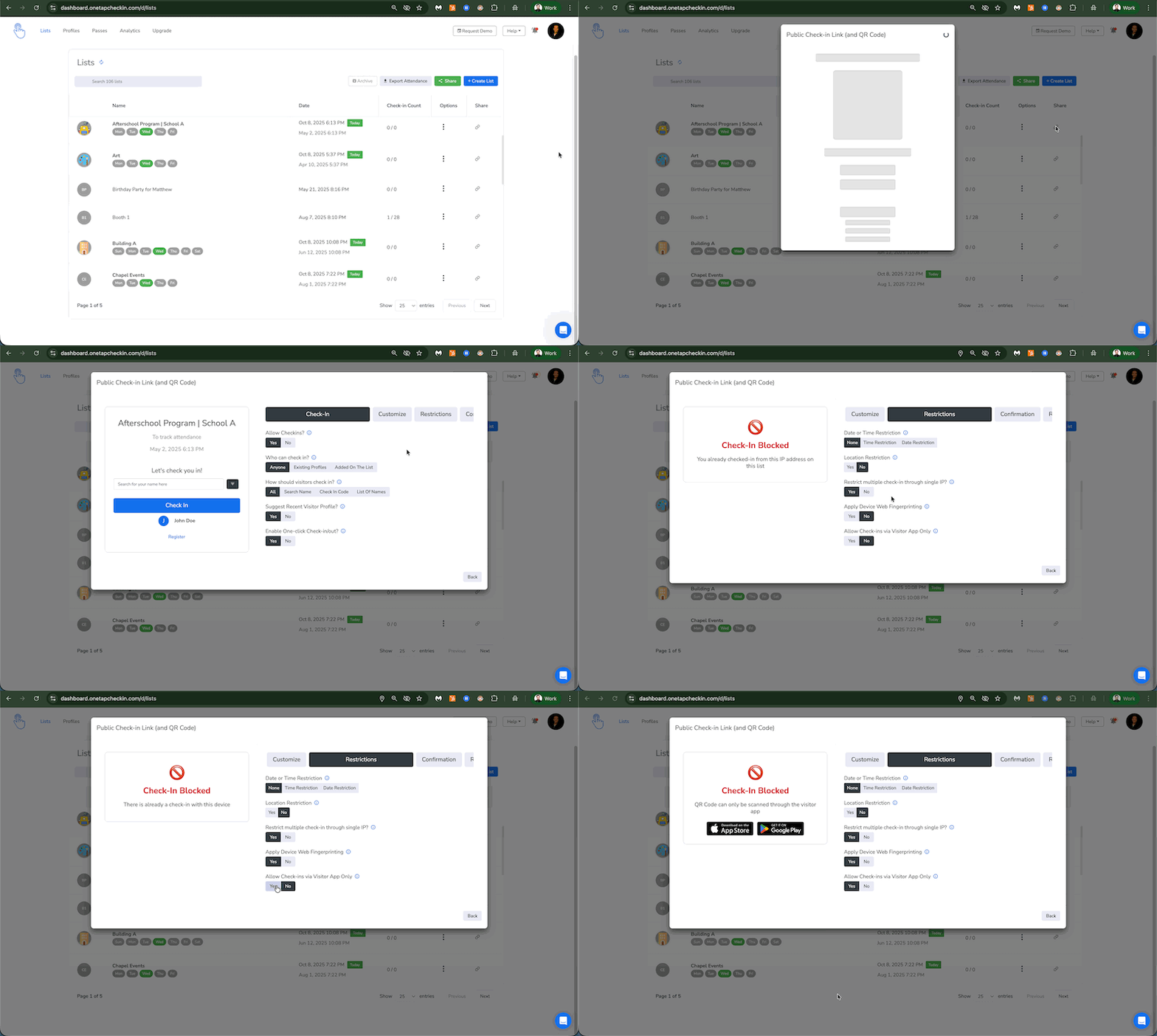
- Access Your List: Navigate to your desired attendance list in the OneTap dashboard
- Open Share Options: Click the three dots next to your list to access the “Actions” menu
- Select Share Check-in Link: Choose “Share Check-in Link” from the dropdown menu
- Access Settings: In the new modal, click the “Settings” button to reveal all restriction options
- Enable Security Features:
- Toggle ON “Restrict multiple check-in through single IP?”
- Toggle ON “Allow Check-ins via Visitor App Only”
- Optionally add location and time restrictions for maximum security
- Save and Share: Your attendees will now need to use the OneTap Visitor App to check in
For Your Attendees
Attendees can download the OneTap Visitor App from:
- iOS: Available on the App Store - Download iOS version here
- Android: Available on Google Play Store - Download Android version here
The app remembers their check-in history and makes future check-ins even faster with just one tap.
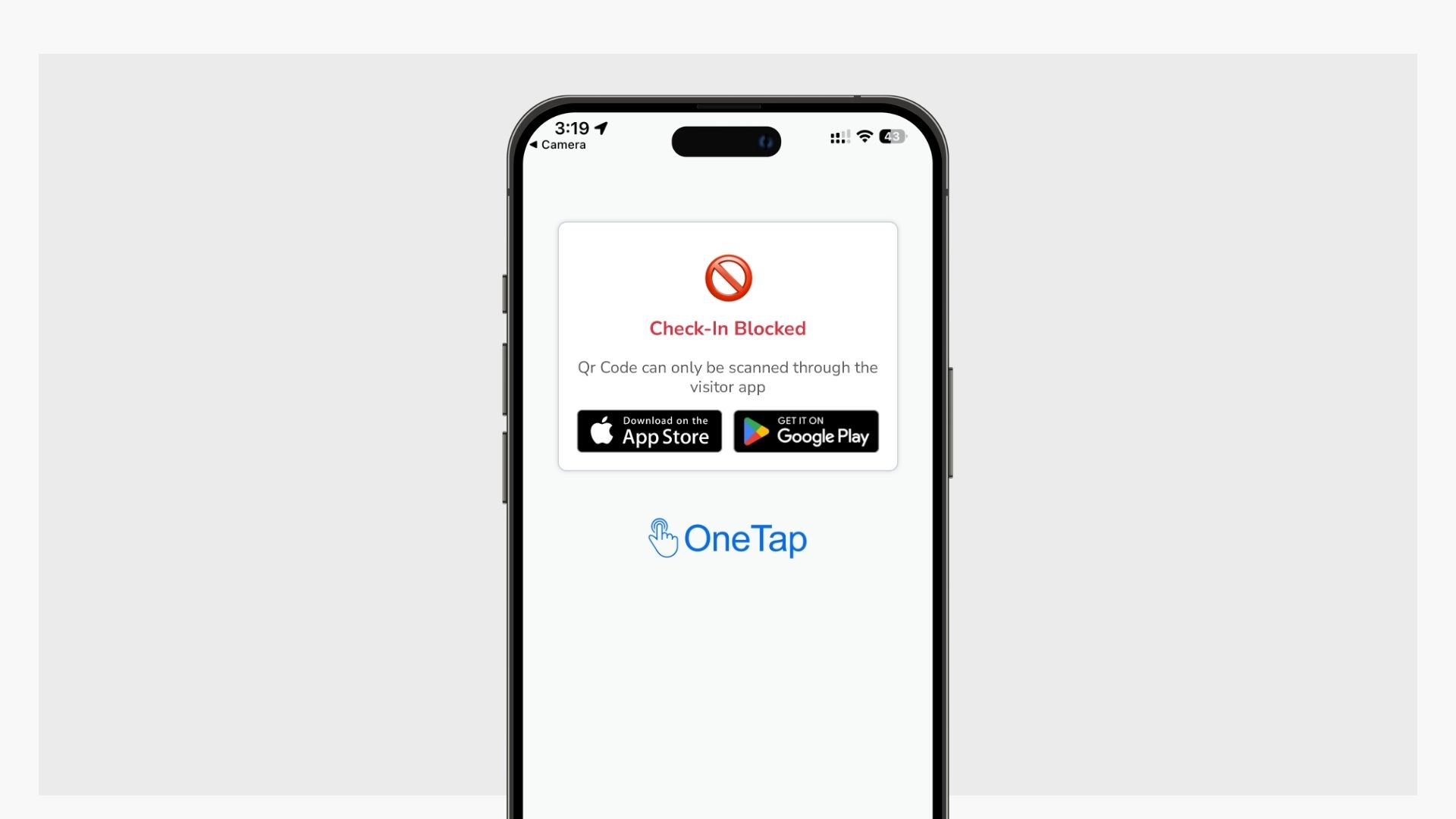
What will attendees see when they try scanning the QR code without the App
Attendees will see an error on the web page saying “Qr Code can only be scanned through the visitor app”, and links to download the Visitor App on their native devices.
Who Is This Feature For?
- Educational Administrators
- University Professors managing large lecture halls
- Trade School Instructors with certification requirements
- K-12 Teachers needing accurate daily attendance
- Online-Hybrid Course Coordinators ensuring in-person participation
- Event Organizers
- Corporate Training Managers requiring participation verification
- Conference Organizers managing attendee access
- Workshop Leaders tracking engagement metrics
- Certification Program Administrators ensuring compliance
- Facility Managers
- Gym and Fitness Center Staff preventing membership fraud
- Community Center Coordinators managing program attendance
- Workplace Safety Officers maintaining accurate building occupancy records
- Nonprofit Program Managers needing accurate participation data for grants
The Ultimate Security Combination
When you combine “Restrict multiple check-in through single IP” with “Allow Check-ins via Visitor App Only”, you create the most secure attendance tracking system available:
 Device-Specific Authentication: Only app users can check in
IP Address Verification: Prevents multiple check-ins from the same device
Enhanced Location Tracking: More accurate GPS data through native app
Session Management: App maintains secure user sessions
Fraud Detection: Detailed reporting reveals suspicious patterns
Getting Started
Ready to implement enhanced check-in security? The feature is rolling out now across all OneTap accounts. Simply navigate to your list and look for the new “Settings” button in the Share Check-in Link modal.
Need help getting started? Our support team is ready to assist with setup and best practices for your specific use case. Contact us through the chat widget on the admin dashboard or email hello@onetapcheckin.com.
Try it today and experience the peace of mind that comes with knowing your attendance records truly reflect who was present! 
What questions do you have about this new feature? Drop a comment below and let’s discuss how this can transform your attendance tracking process!